
Network_Access_Define_and_Control.pdf
ภาพรวมของผู้บริหารโครงสร้างพื้นฐานระบบ

Network Access Management & System Administration Manual
1. Executive Overview of System Infrastructure
A centralized network access system is the architectural cornerstone of modern IT environments, essential for mitigating latency and managing bandwidth contention. Strategic administrative oversight of user profiles and sessions is not merely an operational task; it is a critical requirement for maintaining the reliability and security of the broader IT infrastructure. By centralizing control, administrators can ensure equitable resource distribution and prevent unauthorized access patterns that compromise network performance.
The core functionality of this system is built upon three technical pillars: Comprehensive User Management, Systematic Batch Provisioning, and Granular Auditing. These capabilities allow for the precise enforcement of Quality of Service (QoS) policies while providing a transparent, forensic trail of all network activity. This manual provides the technical workflows necessary to navigate the administrative interface and manage the full user lifecycle with precision.
2. System Access and Administrative Interface
Secure administrative entry points are vital for maintaining system integrity. The Internet User Management System (ระบบบริหารจัดการผู้ใช้งานอินเทอร์เน็ต) is designed with a responsive interface that maintains full functionality across various hardware footprints. This ensures that architects and administrators can perform critical system adjustments whether utilizing a desktop workstation within the office or a mobile device when monitoring infrastructure from external locations.
Interface Scalability and "Large Site" Configurations
The administrative backend is engineered for high scalability, specifically optimized for "Large Site" deployments. In high-density environments, the interface maintains performance and visual clarity, allowing for the management of extensive user databases and hardware nodes without system degradation. This scalability ensures that administrative overhead does not increase exponentially with the size of the network.
Transitioning from initial system access to active resource management begins with the strategic configuration of user profiles.
3. Strategic Profile Configuration: Bandwidth and Usage Logic
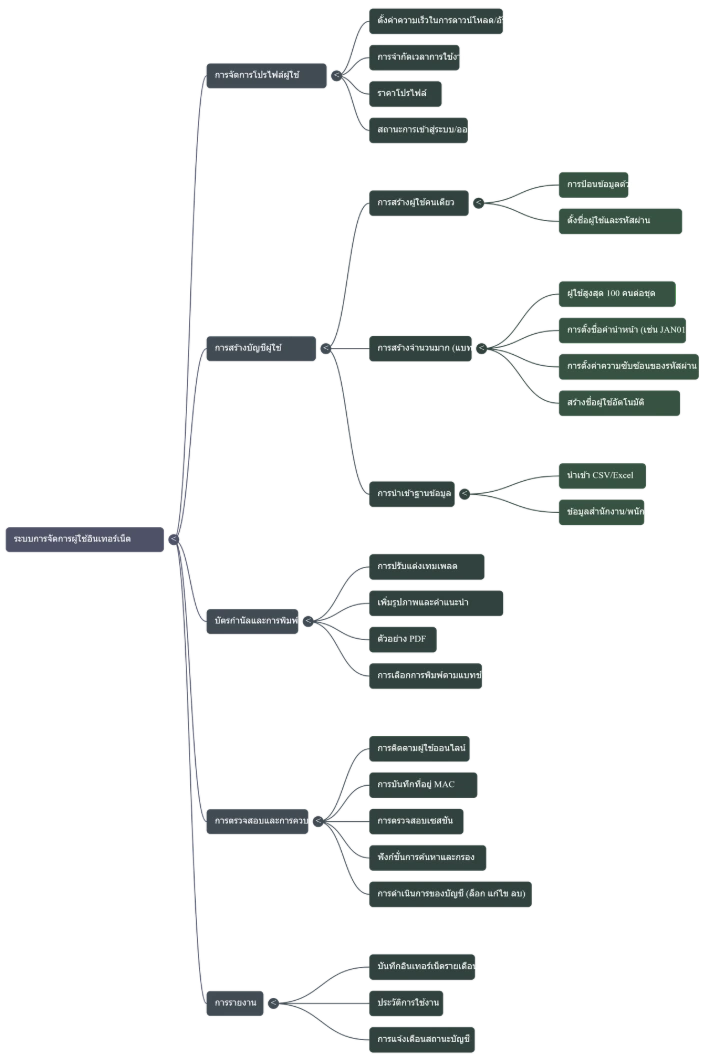
Structured user profiles are the fundamental units of network resource management. By implementing profile-based constraints, administrators can establish robust QoS standards, ensuring that bandwidth allocation is optimized and that no single endpoint can exhaust the available throughput.
Bandwidth-Limited Profiles
The system allows for the definition of precise thresholds for traffic shaping within each profile:
- Download Speed (DL): The maximum downstream throughput allowed per user.
- Upload Speed (UL): The maximum upstream throughput allowed per user.
The system supports two primary usage logic models:
- Daily Usage Limits: Restricting access based on a specific timeframe or data quota per 24-hour cycle.
- Unrestricted Access: Providing persistent connectivity where the only constraints are the defined DL/UL bandwidth caps.
Administrative Naming Conventions
For enhanced clarity in multi-tier service environments, administrators should utilize descriptive "Profile Naming" conventions. Including specific service levels or pricing (e.g., "Gold_100Mbps_1000THB") within the profile name provides immediate context during provisioning and simplifies billing reconciliation for administrative stakeholders.
Once these profile frameworks are defined, they can be utilized for the mass provisioning of user credentials.
4. User Provisioning Methodologies
Provisioning in professional environments requires a dual-track approach: bespoke creation for specific stakeholders and high-efficiency batch processing for general access.
Manual Single-User Creation
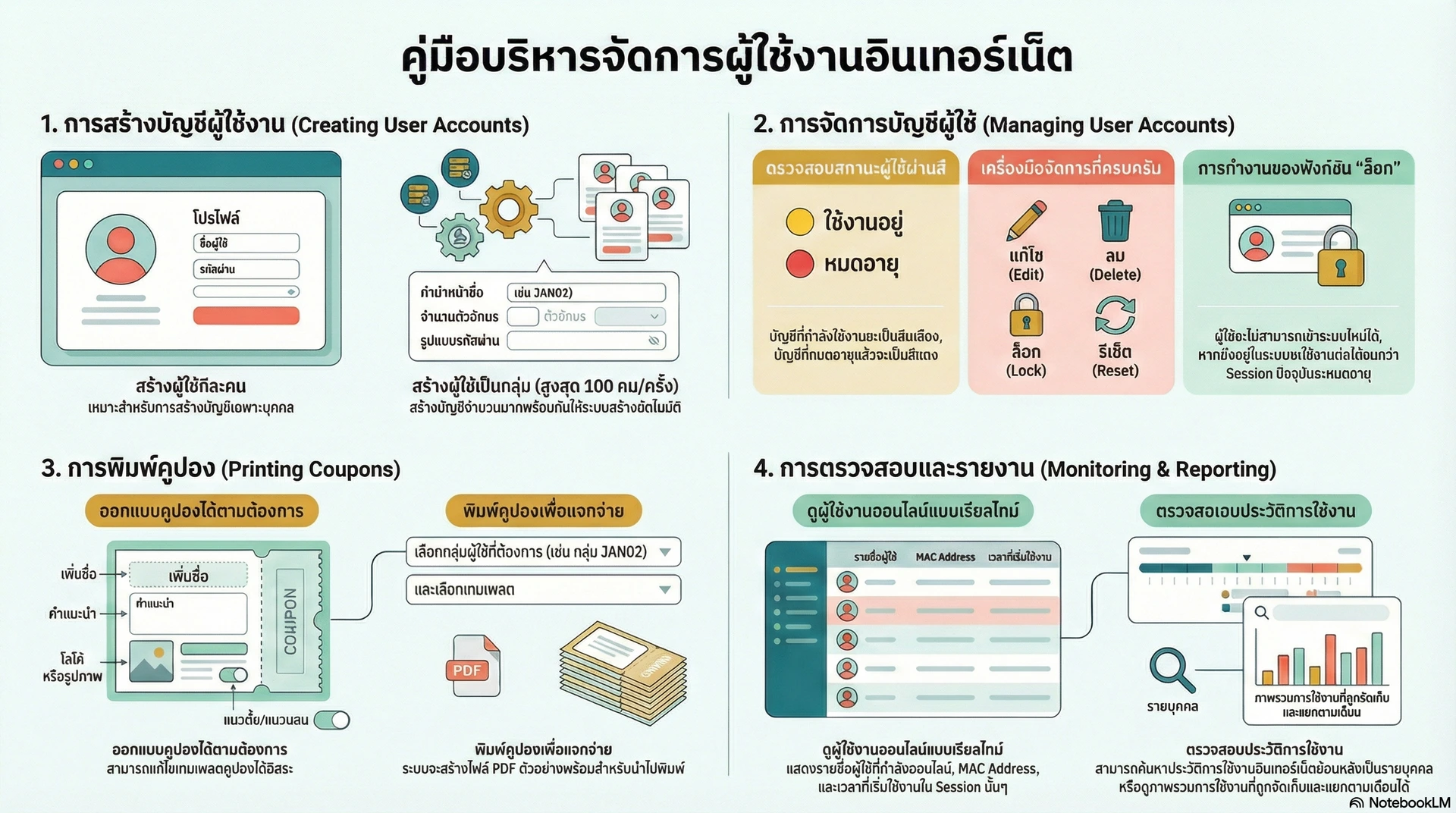
The manual creation tool is reserved for individual accounts or specific administrative access. Mandatory fields include the Username and Password.
CRITICAL ARCHITECTURAL WARNING: Credential fields must not contain spaces. The inclusion of spaces will result in authentication failure and session rejection. Optional metadata, such as Names/Surnames, should be included for personnel-linked accounts to facilitate identity management.
Systematic Batch Generation
For high-volume access requirements, the system facilitates bulk provisioning with a limit of 100 users per instance.
- Naming Methodology: Users are generated using a Prefix + Random Character logic. For example, using the prefix "JAN02" (representing January, Batch 02) combined with 4 random characters results in unique identifiers like "JAN02ab12."
- Credential Logic: To simplify end-user entry while maintaining security, the system generates numeric-only passwords, specifically constrained to 5 digits.
External Database Integration
For corporate deployments or established office environments, the system supports importing user data (Names/Surnames) from external databases. This facilitates the mass provisioning of accounts synchronized with organizational records, streamlining onboarding for existing staff.
Effective provisioning leads directly to the requirement for real-time monitoring and lifecycle tracking of all active sessions.
5. User Lifecycle Management and Auditing
Real-time auditing and session tracking are essential for identifying unauthorized access and preventing resource exhaustion. The administrative dashboard provides immediate visual feedback on the state of every account.
User Status Indicators
The system uses a standardized, color-coded scheme to communicate account status:
Indicator Color | Status Definition |
Yellow | Active / In-Use: The user is currently authenticated with a persistent session. |
Red | Expired: The account's allotted time or data volume has been fully consumed. |
Session Logic and Administrative "Lock" Function
Administrators can Edit, Delete, or Lock accounts. It is critical to understand the underlying session logic:
- Locking Mechanism: A "Lock" prevents a user from initiating any new authentication requests.
- Session Persistence: The system does not "kick" (เตะ) or force-disconnect a user who is already online when a lock is applied. The lock only takes effect once the current session expires or the user manually disconnects.
Online User Audit View
The Online User view tracks active connections with device-level accountability. Every new session is recorded as a unique row in the audit table, tracking:
- Username: The account identity.
- MAC Address: The unique hardware identifier of the connecting device, ensuring device-level accountability.
- Session Start Time: The precise timestamp of the connection.
These credentials and session parameters are finalized for delivery through the voucher generation system.
6. Coupon Customization and Voucher Output
Physical or digital vouchers are the primary interface between the user and the network. Professional consistency and instructional clarity are essential for reducing support overhead.
Customization and "Menu Sport" Navigation
Voucher templates are managed within Menu Sport (เมนูสปอร์ต). Within this specialized interface, administrators can customize:
- Layout & Orientation: Selection between Horizontal or Vertical formats, with options for small or large sizing.
- Branding & Logic: Integration of organizational logos and modification of the "Body" text (via HTML or manual entry) for connection instructions.
Generation Workflow
The printing workflow is designed for precision and efficiency:
- PDF Preview: Administrators must generate a PDF sample to verify layout and branding before committing to a full print run.
- Batch Filtering: To print specific sets, administrators can search for batch prefixes (e.g., searching "JAN02") to isolate and output only the vouchers for that specific generation cycle.
The lifecycle of network management concludes with the archival and logging of all usage data.
7. Systematic Logging and Reporting
Historical data is a vital asset for network forensics and usage analysis. The system maintains an authoritative record of all interactions, which is essential for security compliance.
Log Organization and Forensic Retrieval
"Internet Usage Logs" are organized to facilitate rapid data retrieval:
- Temporal Segmentation: Logs are strictly separated by month to simplify long-term data management and archival.
- Individual User Forensics: Usage history is tied to specific usernames, allowing administrators to audit the resource consumption of individual accounts.
Data Archival and Integrity
Administrators can export or "Save" these logs to external storage. This functionality is critical for providing data to external stakeholders, performing offline forensic analysis, or maintaining off-site administrative backups. Regular audit reviews of these logs are mandatory to maintain the authoritative integrity of the network access system.# Network Access Management & System Administration Manual
1. Executive Overview of System Infrastructure
A centralized network access system is the architectural cornerstone of modern IT environments, essential for mitigating latency and managing bandwidth contention. Strategic administrative oversight of user profiles and sessions is not merely an operational task; it is a critical requirement for maintaining the reliability and security of the broader IT infrastructure. By centralizing control, administrators can ensure equitable resource distribution and prevent unauthorized access patterns that compromise network performance.
The core functionality of this system is built upon three technical pillars: Comprehensive User Management, Systematic Batch Provisioning, and Granular Auditing. These capabilities allow for the precise enforcement of Quality of Service (QoS) policies while providing a transparent, forensic trail of all network activity. This manual provides the technical workflows necessary to navigate the administrative interface and manage the full user lifecycle with precision.
2. System Access and Administrative Interface
Secure administrative entry points are vital for maintaining system integrity. The Internet User Management System (ระบบบริหารจัดการผู้ใช้งานอินเทอร์เน็ต) is designed with a responsive interface that maintains full functionality across various hardware footprints. This ensures that architects and administrators can perform critical system adjustments whether utilizing a desktop workstation within the office or a mobile device when monitoring infrastructure from external locations.
Interface Scalability and "Large Site" Configurations
The administrative backend is engineered for high scalability, specifically optimized for "Large Site" deployments. In high-density environments, the interface maintains performance and visual clarity, allowing for the management of extensive user databases and hardware nodes without system degradation. This scalability ensures that administrative overhead does not increase exponentially with the size of the network.
Transitioning from initial system access to active resource management begins with the strategic configuration of user profiles.
3. Strategic Profile Configuration: Bandwidth and Usage Logic
Structured user profiles are the fundamental units of network resource management. By implementing profile-based constraints, administrators can establish robust QoS standards, ensuring that bandwidth allocation is optimized and that no single endpoint can exhaust the available throughput.
Bandwidth-Limited Profiles
The system allows for the definition of precise thresholds for traffic shaping within each profile:
- Download Speed (DL): The maximum downstream throughput allowed per user.
- Upload Speed (UL): The maximum upstream throughput allowed per user.
The system supports two primary usage logic models:
- Daily Usage Limits: Restricting access based on a specific timeframe or data quota per 24-hour cycle.
- Unrestricted Access: Providing persistent connectivity where the only constraints are the defined DL/UL bandwidth caps.
Administrative Naming Conventions
For enhanced clarity in multi-tier service environments, administrators should utilize descriptive "Profile Naming" conventions. Including specific service levels or pricing (e.g., "Gold_100Mbps_1000THB") within the profile name provides immediate context during provisioning and simplifies billing reconciliation for administrative stakeholders.
Once these profile frameworks are defined, they can be utilized for the mass provisioning of user credentials.
4. User Provisioning Methodologies
Provisioning in professional environments requires a dual-track approach: bespoke creation for specific stakeholders and high-efficiency batch processing for general access.
Manual Single-User Creation
The manual creation tool is reserved for individual accounts or specific administrative access. Mandatory fields include the Username and Password.
CRITICAL ARCHITECTURAL WARNING: Credential fields must not contain spaces. The inclusion of spaces will result in authentication failure and session rejection. Optional metadata, such as Names/Surnames, should be included for personnel-linked accounts to facilitate identity management.
Systematic Batch Generation
For high-volume access requirements, the system facilitates bulk provisioning with a limit of 100 users per instance.
- Naming Methodology: Users are generated using a Prefix + Random Character logic. For example, using the prefix "JAN02" (representing January, Batch 02) combined with 4 random characters results in unique identifiers like "JAN02ab12."
- Credential Logic: To simplify end-user entry while maintaining security, the system generates numeric-only passwords, specifically constrained to 5 digits.
External Database Integration
For corporate deployments or established office environments, the system supports importing user data (Names/Surnames) from external databases. This facilitates the mass provisioning of accounts synchronized with organizational records, streamlining onboarding for existing staff.
Effective provisioning leads directly to the requirement for real-time monitoring and lifecycle tracking of all active sessions.
5. User Lifecycle Management and Auditing
Real-time auditing and session tracking are essential for identifying unauthorized access and preventing resource exhaustion. The administrative dashboard provides immediate visual feedback on the state of every account.
User Status Indicators
The system uses a standardized, color-coded scheme to communicate account status:
Indicator Color | Status Definition |
Yellow | Active / In-Use: The user is currently authenticated with a persistent session. |
Red | Expired: The account's allotted time or data volume has been fully consumed. |
Session Logic and Administrative "Lock" Function
Administrators can Edit, Delete, or Lock accounts. It is critical to understand the underlying session logic:
- Locking Mechanism: A "Lock" prevents a user from initiating any new authentication requests.
- Session Persistence: The system does not "kick" (เตะ) or force-disconnect a user who is already online when a lock is applied. The lock only takes effect once the current session expires or the user manually disconnects.
Online User Audit View
The Online User view tracks active connections with device-level accountability. Every new session is recorded as a unique row in the audit table, tracking:
- Username: The account identity.
- MAC Address: The unique hardware identifier of the connecting device, ensuring device-level accountability.
- Session Start Time: The precise timestamp of the connection.
These credentials and session parameters are finalized for delivery through the voucher generation system.
6. Coupon Customization and Voucher Output
Physical or digital vouchers are the primary interface between the user and the network. Professional consistency and instructional clarity are essential for reducing support overhead.
Customization and "Menu Sport" Navigation
Voucher templates are managed within Menu Sport (เมนูสปอร์ต). Within this specialized interface, administrators can customize:
- Layout & Orientation: Selection between Horizontal or Vertical formats, with options for small or large sizing.
- Branding & Logic: Integration of organizational logos and modification of the "Body" text (via HTML or manual entry) for connection instructions.
Generation Workflow
The printing workflow is designed for precision and efficiency:
- PDF Preview: Administrators must generate a PDF sample to verify layout and branding before committing to a full print run.
- Batch Filtering: To print specific sets, administrators can search for batch prefixes (e.g., searching "JAN02") to isolate and output only the vouchers for that specific generation cycle.
The lifecycle of network management concludes with the archival and logging of all usage data.
7. Systematic Logging and Reporting
Historical data is a vital asset for network forensics and usage analysis. The system maintains an authoritative record of all interactions, which is essential for security compliance.
Log Organization and Forensic Retrieval
"Internet Usage Logs" are organized to facilitate rapid data retrieval:
- Temporal Segmentation: Logs are strictly separated by month to simplify long-term data management and archival.
- Individual User Forensics: Usage history is tied to specific usernames, allowing administrators to audit the resource consumption of individual accounts.
Data Archival and Integrity
Administrators can export or "Save" these logs to external storage. This functionality is critical for providing data to external stakeholders, performing offline forensic analysis, or maintaining off-site administrative backups. Regular audit reviews of these logs are mandatory to maintain the authoritative integrity of the network access system.